As a crucial step to ensure seamless integration and data analysis with M365, we've created a tailored onboarding process for you. Here, you can grant the necessary Microsoft Graph permissions to empower M365 Cost Control to efficiently analyze your M365 data. To get you started we kindly ask you to complete the two steps below. Please note that both the steps must be completed by an admin user.
Onboarding - M365 Cost Control
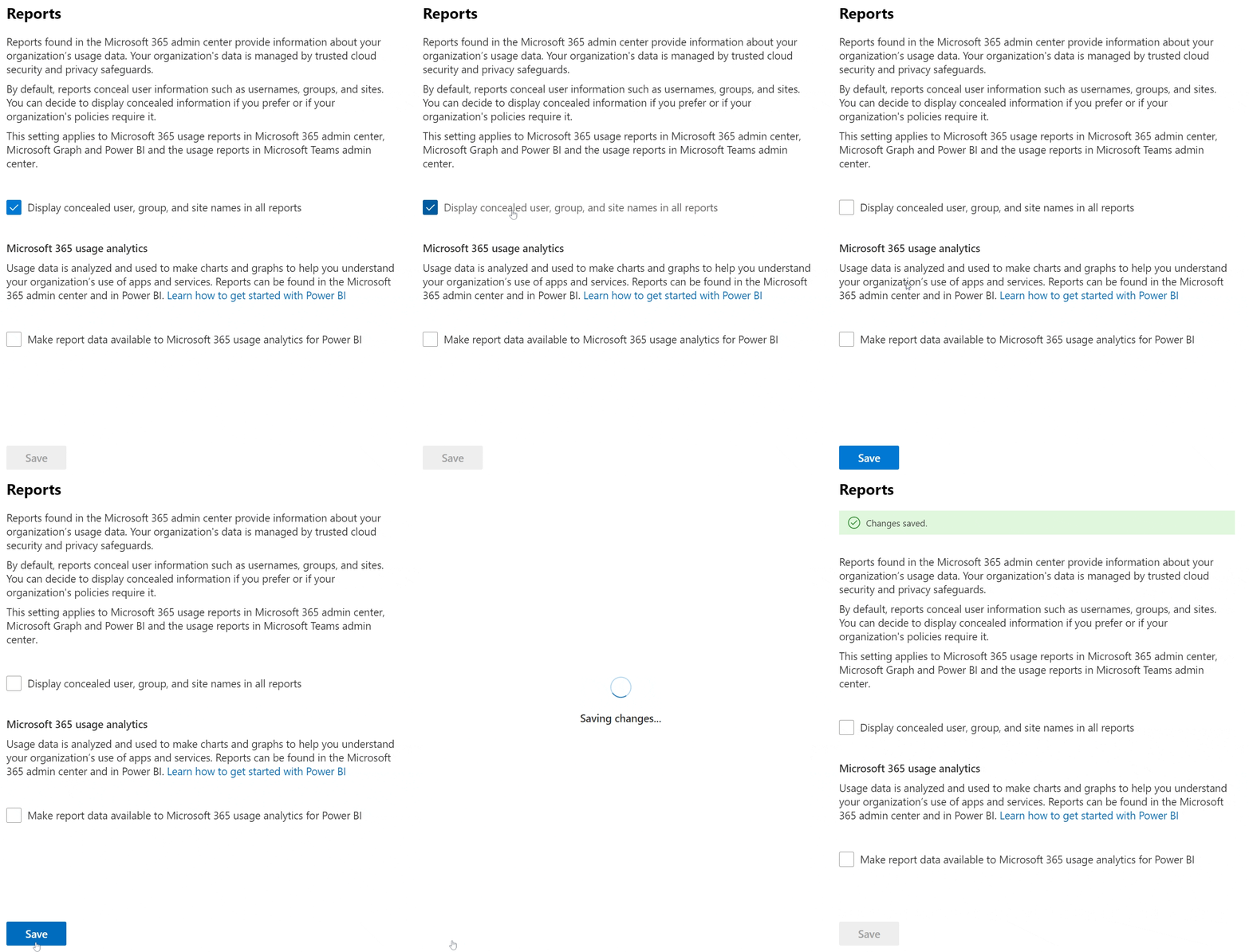
1 - Disable M365 data anonymization
To get the best experience with M365 Cost Control, a small adjustment in the Microsoft 365 portal settings is needed. The setting “Display concealed user, group, and site names in all reports” needs to be disabled in org settings. Disabling this setting will enable the data product to access the necessary information without the anonymization layer, ensuring that all features and functionalities work seamlessly. The button below will take you the right place in the M365 Portal.
2 - Multi Tenant onboarding
The second step of the onboarding is granting us access to your M365 data, this is done by provisioning our enterprise application in your tenant. This application has the minimum required permissions to extract the data needed to produce your report. The below link will automatically provision the application in your tenant after consent is obtained. Please note that the procedure must be done for each tenant and can only be done by an admin user.